Formatting Spreadsheet for Essential Graphics Dropdown Menu Selections
-
Hello! I’m currently a trial user trying to see how Templater can play a role in batch automating several of our projects for our venue.
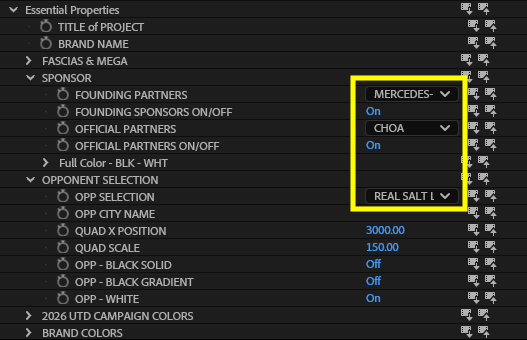
We build out an AEP master template that has a ton of our common changes placed in the Essential Graphics panel such as dynamic text and sponsor selections based on a drop down menu. I’ve been able to get a spreadsheet formatted to read the parameters that are text, true/false boxes, and transforms working just fine. The last thing I can’t seem to figure out is how to format the column for drop down menus.
Here is a view of the dropdowns I’m referencing just for clarity:
Here is how I’ve got the spreadsheet columns formatted to try and read those parameters:

Any help would be greatly appreciated! Thank you!
-
Great question!
For Dropdown Menu items like the ones in the screenshot, we’d want to use a numeric value to indicate which menu item you want. So, for the first menu item we’d use 1, for the second 2, and so on.
If we wanted to put a little more work in, we could also use a MATCH or VLOOKUP formula in our Google Sheet to match the text with a menu value that Templater can read. You can check out more information about those functions here:
https://support.google.com/docs/answer/3093378
https://support.google.com/docs/answer/3093318Hopefully, that helps to get things moving in the right direction, but if you have any other questions, please don’t hesitate to reach out.
Thanks,
Jeff
-
Thanks Jeff! The VLOOKUP function got this working for me across several different use cases and menus. The last problem I’m running in to before trying to render anything is a Checkbox Controller not wanting to work for some reason.
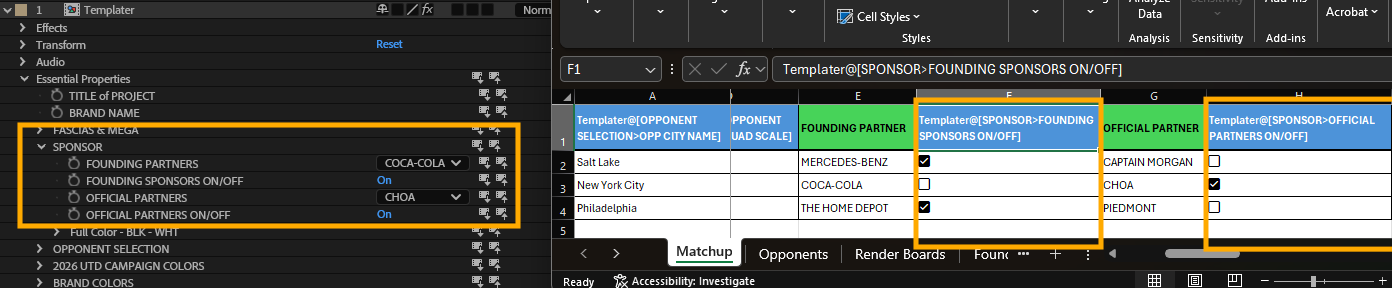
We have some sponsors that can’t go on some boards so we have a controller to turn them off. I’ve got two checkboxes that in Excel that save as TRUE/FALSE once converted to a .tsv, but only one of the columns is actually connecting even though the names are matching between AE and Excel (Founding Sponsor is not working while Official Partners does)
Appreciate all the help on this!
-
From the screenshots, it seems like the layers in the EGP panel are checkboxes. Is that correct? If so, we’ll want to pass either a 1 or a 0 instead of TRUE or FALSE.
In my experience, After Effects tends to use numerals rather than Boolean operators when it comes to these layer control elements. Give that a shot, and if you still have trouble, we’ll probably need to see how the layer in question is set up in the main project comp that’s feeding the EGP panel.
Also, keep in mind that you can always email us at support@dataclay.com if you’re uncomfortable sharing information here.
Thanks,
Jeff
-
Makes sense, and thanks for the quick response! I’ll give it a shot and email support if I run into any issues down the line!